The Importance of Printing Speed and Reliability in Receipt Printers
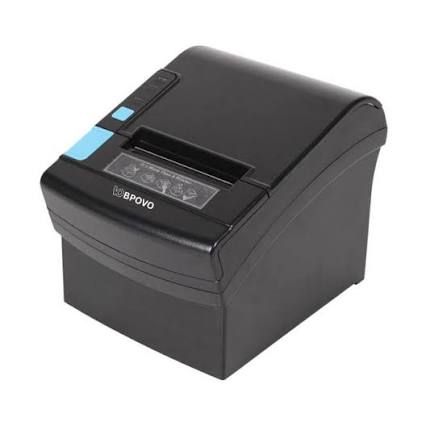
Printing speed and reliability are important performance factors in businesses that process frequent customer transactions. Retail stores, supermarkets, restaurants, pharmacies, and other service providers depend on receipt printing to complete purchases and provide customers with transaction records. When printing is slow or inconsistent, checkout operations can become less efficient, leading to longer waiting times and unnecessary interruptions.
Choosing the right Receipt Printer involves more than comparing product prices or physical dimensions. Businesses should evaluate how quickly a device can produce receipts, how consistently it operates during busy periods, and whether its performance matches daily transaction demands.
1. Why Printing Speed Matters in Daily Business Operations
Printing speed directly affects how quickly employees can complete transactions. In environments with high customer traffic, even a small delay at each checkout can increase waiting times over the course of a business day.
Fast receipt printing helps cashiers complete sales efficiently and move on to the next customer. Restaurants can also benefit from quick printing when producing order receipts, payment records, or kitchen tickets. In these environments, efficient printing supports better coordination between employees and reduces unnecessary delays.
However, printing speed should be considered alongside other operational requirements. A fast device that frequently experiences paper jams or connection failures may create more delays than a slightly slower but dependable model.
2. Understanding Receipt Printer Speed Specifications
Receipt printer speed is commonly measured in millimeters per second (mm/s). This specification indicates how much paper the device can print within one second under suitable operating conditions.
A higher rated speed can be beneficial for businesses that produce long receipts or process many transactions. However, actual performance may vary depending on the content being printed, connection type, print-density settings, and the capabilities of the connected POS system.
Businesses should therefore consider typical receipt length and transaction volume rather than selecting a printer based on its maximum speed alone.
3. How Printing Speed Improves Customer Checkout Experiences
Customers generally expect payment and checkout processes to be completed without unnecessary waiting. Although payment authorization and employee efficiency also influence transaction time, receipt printing is an important part of the overall process.
A printer that produces receipts quickly helps reduce the time customers spend waiting after payment. This can be particularly valuable during lunch periods, seasonal promotions, holidays, and other busy shopping hours.
Faster printing also helps employees maintain a consistent checkout rhythm. When several customers are waiting, reducing small operational delays can contribute to a smoother service experience.
4. The Role of Reliability in Continuous Operations
Reliability refers to a printer’s ability to perform its intended functions consistently over time. A dependable device should produce readable receipts, feed paper correctly, maintain stable connections, and operate without frequent technical interruptions.
For businesses, reliability is especially important because receipt printing is often part of a larger transaction workflow. A printer failure may delay checkout, create additional work for employees, or require manual transaction documentation.
Reliable operation also helps businesses maintain predictable workflows. Employees can focus on customer service instead of repeatedly resolving paper-feed errors, connection failures, or printing defects.
5. Why Reliability Becomes More Important During Peak Hours
Businesses often experience significant changes in transaction volume throughout the day. A restaurant may be busiest during lunch and dinner, while a supermarket may experience heavy traffic in the evening or on weekends.
During these periods, printers may handle a continuous sequence of print commands. Devices that cannot maintain stable performance under frequent use may experience overheating, paper-feed problems, or communication interruptions.
Selecting a printer designed for the expected workload can help reduce these risks. Businesses should review manufacturer specifications and consider the recommended operating conditions before choosing a model for high-volume environments.
6. Factors That Influence Receipt Printing Speed
Several technical and operational factors determine how quickly a receipt printer completes a print job.
Printhead Technology
Thermal printers use heat-sensitive paper and a thermal printhead to produce text and graphics. Their relatively simple printing process allows many models to deliver fast output without using ink cartridges or ribbons.
Receipt Content
A receipt containing only transaction details may print faster than one with large logos, detailed graphics, or extensive formatting. The complexity and density of the printed content can influence actual output speed.
Connection Type
USB, Ethernet, Bluetooth, and Wi-Fi connections offer different performance characteristics. A stable connection helps print commands reach the device without unnecessary communication delays.
Printer Configuration
Print density, paper width, character formatting, and other settings can affect performance. Incorrect configuration may reduce printing efficiency or cause inconsistent results.
POS System Performance
The connected computer or POS terminal also plays a role. Slow software processing, outdated drivers, or excessive background tasks may delay print commands before they reach the printer.
7. Features That Support Long-Term Printer Reliability
A printer’s reliability depends on the quality of its components, construction, and operating design. Businesses evaluating different models should examine several important features.
- Durable printhead: A well-designed printhead supports consistent output and helps maintain readable receipts.
- Stable paper-feeding mechanism: Reliable rollers and feeding components reduce the likelihood of paper jams and misalignment.
- Effective heat management: Suitable thermal management helps the printer operate consistently under regular workloads.
- Secure connectivity: Dependable wired or wireless connections reduce communication interruptions.
- Automatic cutter: A properly designed cutter supports efficient receipt handling in businesses that print frequently.
- Maintenance accessibility: Easy access to the paper compartment and cleaning areas simplifies routine maintenance.
These features should be evaluated according to the intended application rather than treated as equally important for every business.
8. Balancing Printing Speed and Print Quality
High printing speed is valuable, but it should not come at the expense of readability. Receipts need to display transaction information clearly, including product descriptions, prices, tax details, payment methods, and business information.
Poor print quality can make receipts difficult to read and create problems when customers need to verify purchases or process returns. Businesses should therefore look for a balance between output speed and consistent print clarity.
Testing a printer with typical receipt content can provide a better understanding of its real-world performance. This approach helps buyers evaluate how the device handles different text sizes, logos, barcodes, and transaction details.
9. The Importance of Regular Maintenance
Even a well-designed printer can experience performance problems without proper care. Dust, paper residue, unsuitable supplies, and worn components may gradually affect printing quality and reliability.
A regular maintenance routine should include cleaning accessible components, checking the paper path, inspecting cables, and using compatible paper rolls. Businesses should also follow the manufacturer’s recommended cleaning procedures to avoid damaging sensitive parts.
For high-volume environments, maintenance can be scheduled during quieter operating periods. This reduces the likelihood of unexpected interruptions when transaction activity increases.
10. Choosing the Right Printer for Different Business Environments
Printing requirements vary depending on the industry, transaction volume, and operating environment.
Retail Stores and Supermarkets
These businesses often process many transactions throughout the day. Fast printing, dependable paper feeding, and stable POS connectivity are important for maintaining checkout efficiency.
Restaurants and Cafés
Restaurants may need printers for customer receipts, kitchen orders, and payment documentation. Reliability and compatibility with restaurant management software are particularly important.
Pharmacies and Healthcare Retail
Clear printing is essential when receipts contain detailed product information, transaction records, or other important purchase details. Consistent output and dependable operation help support accurate documentation.
Small Businesses and Service Counters
Smaller businesses may have lower transaction volumes but still require dependable printing. Compact dimensions, straightforward installation, and affordable maintenance may be more important than maximum printing speed.
11. How to Evaluate Printer Performance Before Purchasing
Product specifications provide useful information, but practical testing can reveal how a printer performs in everyday conditions. Businesses should evaluate devices using the type of receipts they expect to produce.
Important evaluation points include:
- Rated printing speed: Compare the manufacturer’s stated speed with the business’s expected workload.
- Print clarity: Check whether text, logos, and barcodes are consistently readable.
- Continuous operation: Observe how the printer performs during repeated print jobs.
- Connection stability: Test the available interfaces with the existing POS system.
- Paper compatibility: Confirm the supported paper width and roll dimensions.
- Maintenance requirements: Review cleaning procedures and the availability of replacement components.
- Software support: Verify compatibility with the operating systems and applications used by the business.
These checks help buyers identify devices that meet practical requirements rather than relying only on advertised specifications.
12. The Long-Term Business Benefits of Speed and Reliability
A printer that combines fast output with dependable operation can contribute to more efficient business processes. Shorter printing delays help employees complete transactions, while consistent performance reduces the time spent handling technical problems.
Reliability can also lower operational costs by reducing unnecessary service interruptions and repeated maintenance. When employees spend less time troubleshooting equipment, they can focus more attention on customers and other responsibilities.
Over time, selecting a printer that matches transaction volume and operating conditions can support a more predictable checkout environment. This is particularly important for businesses planning to expand their operations or increase the number of checkout stations.
Conclusion
Printing speed and reliability are essential considerations when selecting receipt printing equipment. Fast output helps businesses process transactions efficiently, while dependable operation supports consistent service during both normal and peak business hours.
The best choice depends on transaction volume, receipt content, connectivity requirements, print quality, and maintenance needs. By evaluating these factors together, businesses can select equipment that supports efficient checkout processes and reliable daily operations over the long term.






Post Comment