Key Features That Make Xprinter Thermal Printers Suitable for Modern Businesses
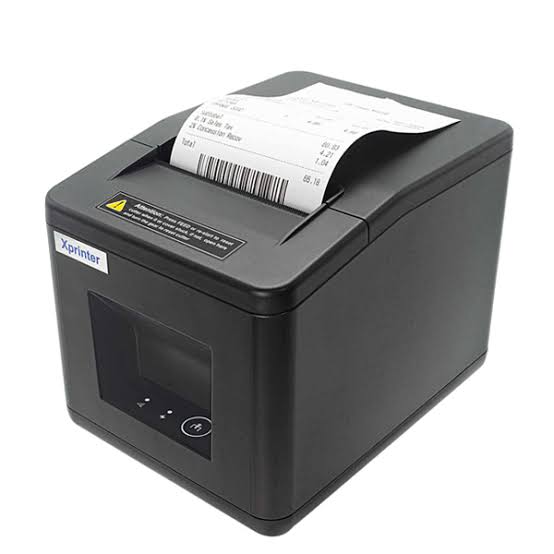
Modern businesses depend on reliable printing solutions to manage transactions, organize inventory, process orders, and maintain accurate records. From retail stores and restaurants to warehouses and logistics companies, printing equipment plays an important role in everyday operations. As businesses look for faster and more efficient ways to handle these tasks, thermal printing technology has become an increasingly practical option.
An Xprinter Thermal Printer offers features designed to support different commercial printing requirements. Its printing technology, connectivity options, compact design, and operational convenience make thermal printers useful across various industries. Understanding these features can help businesses evaluate how thermal printing equipment fits into their existing workflows.
1. Fast and Efficient Printing Performance
Printing speed is an important consideration for businesses that handle frequent transactions or large numbers of labels. Thermal printers are designed to produce printed output quickly without the delays associated with certain conventional printing processes.
In retail environments, faster receipt printing can help reduce waiting times at checkout counters. Restaurants can also benefit from efficient order printing, allowing kitchen staff to receive instructions promptly.
For warehouses and distribution centers, printing speed becomes particularly important when generating multiple shipping labels, product identifiers, or inventory records throughout the day.
2. Ink-Free Printing Technology
One of the most recognizable characteristics of direct thermal printers is their ability to operate without traditional ink cartridges or toner.
Instead, the printing mechanism uses heat-sensitive paper that darkens when exposed to controlled temperatures. This reduces the need to purchase and replace ink-related consumables.
Thermal transfer printers use ribbons instead of ink cartridges, so their consumable requirements differ. Understanding which printing method a particular model supports is important when estimating ongoing operating expenses.
3. Compact and Space-Saving Design
Many modern businesses operate in environments where workspace is limited. Checkout counters, service desks, restaurant preparation areas, and small offices often have several devices competing for available space.
Compact thermal printers can help address this challenge. Their relatively small footprints make them easier to position alongside computers, cash registers, payment terminals, and other essential equipment.
Some models are also designed for mobile or portable applications, providing additional flexibility for businesses that require printing away from a fixed workstation.
4. Multiple Connectivity Options
Connectivity plays a major role in integrating printing equipment with business systems. Modern thermal printers may support several communication interfaces, depending on their individual specifications.
Common connectivity options include:
- USB: Provides a straightforward wired connection to computers and compatible point-of-sale systems.
- Ethernet: Allows network-based printing in environments where multiple workstations need access to a shared printer.
- Bluetooth: Supports wireless communication with compatible mobile devices and tablets.
- Wi-Fi: Enables wireless printing across supported network environments.
- Serial interfaces: Can support older commercial equipment and specialized systems.
Having suitable connectivity options can simplify installation and improve communication between printing devices and existing business software.
5. Clear Text and Barcode Printing
Readable printed information is essential for many commercial applications. Thermal printing technology can produce clear text, numerical information, graphics, and barcodes when the correct media and print settings are used.
This capability is particularly valuable in retail and logistics operations, where barcode readability directly affects scanning and identification processes.
Print resolution is an important specification to examine. A printer with an appropriate DPI rating can produce detailed output suitable for different label sizes and printing requirements.
Businesses should also consider label dimensions, barcode formats, and the scanning equipment used in their operations.
6. Support for Different Business Applications
Modern businesses have diverse printing requirements. A single printing category cannot address every application, which is why thermal printers are available in different configurations.
Common application areas include:
Retail and Supermarkets
Retail businesses use thermal receipt printers to generate transaction records, payment details, and customer receipts. Fast output helps maintain smoother checkout operations.
Restaurants and Cafés
Restaurants use receipt and kitchen printers to communicate customer orders, prepare billing documents, and organize takeaway or delivery transactions.
Warehousing and Logistics
Label printers help warehouse employees identify products, organize storage locations, and prepare packages for shipment. Barcode printing also supports inventory tracking.
Healthcare and Pharmaceutical Services
Healthcare facilities may use thermal printers for patient identification, specimen labels, prescription documentation, and administrative records.
Transportation and Ticketing
Thermal printing equipment can generate parking tickets, boarding documents, travel tickets, and other transaction-related materials.
7. Convenient Paper and Media Handling
Efficient media handling helps reduce interruptions during busy working hours. Many thermal printers include practical loading mechanisms that make it easier to replace paper rolls or label supplies.
Depending on the model, additional features may include paper sensors, automatic cutting mechanisms, adjustable media guides, and label detection systems.
These functions can improve daily convenience and help reduce printing interruptions. However, businesses should confirm the supported paper width, roll diameter, label dimensions, and media specifications before selecting a device.
8. Lower Routine Maintenance Requirements
Thermal printers generally have fewer ink-related maintenance requirements than conventional inkjet printers. Direct thermal models, in particular, do not require ink cartridges or ribbons.
However, this does not mean that thermal printers are maintenance-free. Printheads, rollers, sensors, and feeding mechanisms require periodic inspection and cleaning.
Regular maintenance helps prevent common problems such as faded output, paper misalignment, inconsistent printing, and barcode readability issues.
Following manufacturer-recommended cleaning procedures can also help maintain reliable performance over time.
9. Compatibility with Business Software
A printing device must communicate effectively with the software used by a business. Modern commercial printing environments often rely on point-of-sale applications, inventory management platforms, shipping systems, and specialized business software.
Printer compatibility depends on supported drivers, operating systems, communication protocols, and command languages.
Before purchasing a thermal printer, businesses should verify whether it works with their existing systems. Testing the device with the intended software can help identify compatibility issues before full deployment.
10. Cost-Effective Operation for Different Workloads
Operating expenses are an important consideration when businesses invest in printing equipment. Thermal printing can help simplify certain cost factors, particularly when direct thermal technology eliminates the need for ink or toner.
However, the total cost of ownership involves more than the initial purchase price. Businesses should also evaluate:
- Paper or label consumption.
- Ribbon expenses for thermal transfer models.
- Printhead replacement requirements.
- Maintenance and servicing costs.
- Electricity consumption.
- Expected daily printing volume.
Comparing these factors provides a more realistic understanding of long-term operating costs.
11. User-Friendly Operation
Ease of use is another feature that makes thermal printing practical in busy commercial environments. Many models are designed with straightforward controls, accessible paper compartments, and simple loading procedures.
These characteristics can reduce the time employees spend learning basic printer operations.
Clear status indicators and error notifications can also help users identify common issues, such as paper shortages or incorrect media installation. Simple operation is particularly valuable in businesses where multiple employees share the same equipment.
12. What Businesses Should Consider Before Choosing a Model
Although thermal printers offer several useful capabilities, not every model is suitable for every business. Selecting the right equipment requires matching its specifications with actual operational needs.
Important considerations include:
Printing requirements: Determine whether the business primarily needs receipts, shipping labels, product labels, or other printed materials.
Printing volume: Estimate the number of pages, receipts, or labels required per day to identify suitable performance specifications.
Print resolution: Select an appropriate resolution based on text size, barcode complexity, and graphic requirements.
Connectivity: Check whether the printer supports the wired or wireless interfaces used by existing devices.
Media compatibility: Confirm that the printer supports the required paper types, label sizes, and material dimensions.
Durability: Consider the working environment, operating hours, and expected frequency of use.
Technical support: Evaluate documentation, driver availability, replacement components, and servicing arrangements.
These considerations help businesses avoid purchasing equipment that does not meet their actual requirements.
Conclusion
The features of modern Xprinter thermal printers make them relevant to businesses that need efficient receipt, label, and barcode printing. Fast output, ink-free direct thermal technology, compact designs, flexible connectivity, and convenient media handling can support a variety of commercial workflows.
However, the right choice depends on the specific application, printing volume, software compatibility, and long-term operating requirements. By evaluating these factors carefully, businesses can select thermal printing equipment that supports daily productivity while maintaining consistent and reliable printing performance.






Post Comment