Important Features to Consider When Buying a Thermal Printer
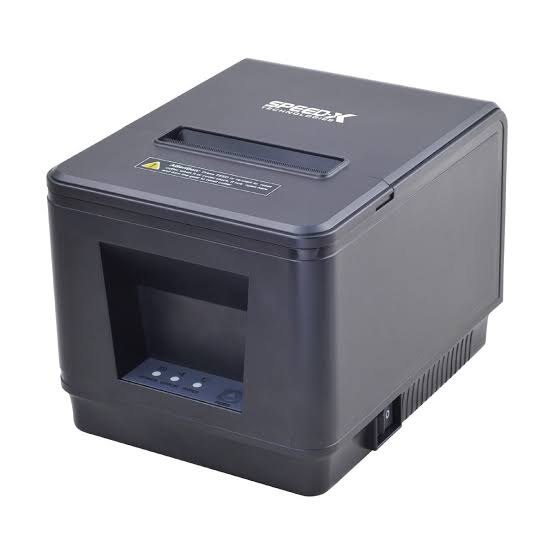
Choosing the right printing equipment is an important decision for businesses that depend on accurate and consistent printing. Retail stores, restaurants, warehouses, manufacturing facilities, and logistics companies use thermal printing technology for receipts, product labels, shipping documents, and barcode identification. However, different applications require different printer capabilities, making it essential to evaluate technical specifications before purchasing.
A Thermal Printer uses heat to create text, graphics, and barcodes on compatible printing materials. Its performance depends on several factors, including printing technology, resolution, speed, connectivity, media compatibility, and build quality. Understanding these features helps businesses select equipment that meets their operational requirements while controlling long-term costs.
1. Printing Technology: Direct Thermal or Thermal Transfer
One of the first decisions when buying a thermal printer is choosing between direct thermal and thermal transfer technology. Both methods use heat but differ in how they produce printed images.
Direct Thermal Printing
Direct thermal printers apply heat directly to specially coated paper or labels. The heat activates the coating to create text and images without requiring ink or ribbons.
This technology is commonly used for:
- Retail receipts
- Shipping labels
- Temporary product labels
- Restaurant order tickets
- Queue and parking tickets
Direct thermal printing offers straightforward operation and fewer consumable requirements. However, printed output can be sensitive to heat, sunlight, friction, and certain chemicals.
Thermal Transfer Printing
Thermal transfer printers use a heated printhead to transfer ink from a ribbon onto compatible label materials.
They are often suitable for:
- Product identification labels
- Warehouse inventory tags
- Asset tracking labels
- Industrial equipment identification
- Long-term storage labels
The durability of thermal transfer output depends on the ribbon and label material selected. Businesses should consider the expected lifespan and environmental exposure of printed information before choosing either technology.
2. Print Resolution
Print resolution determines how clearly a printer reproduces text, graphics, and barcodes. It is generally measured in dots per inch (DPI).
Common thermal printer resolutions include 203 DPI and 300 DPI, while some specialized models offer higher resolutions.
A standard receipt printer may not require extremely high resolution because receipts usually contain basic transaction information. However, businesses printing small product labels, detailed graphics, or compact barcodes may benefit from higher-resolution equipment.
When comparing resolution specifications, consider the size of printed content and whether barcode scanners can read the output reliably. Testing actual samples is a practical way to evaluate print quality before purchasing.
3. Printing Speed
Printing speed is particularly important for businesses that process large numbers of transactions or produce labels throughout the day.
Receipt printer speeds are commonly measured in millimeters per second, while label printer performance may also be evaluated by the number of labels produced within a given period.
Consider the following factors:
- Average daily printing volume
- Expected peak workload
- Required receipt or label dimensions
- Complexity of printed content
- Available time for each printing task
A faster printer can improve workflow efficiency, but speed should be considered alongside print quality and the manufacturer’s recommended operating capacity.
4. Connectivity Options
A thermal printer must communicate effectively with the devices and software used by the business. Different models support different connection interfaces, so compatibility should be checked before purchasing.
Common connectivity options include:
USB: Provides a direct connection to compatible computers and POS terminals.
Ethernet: Allows network-based printing from supported devices within a local business network.
Bluetooth: Supports wireless printing from compatible smartphones, tablets, and mobile POS systems.
Wi-Fi: Enables communication through a supported wireless network and can provide greater flexibility in printer placement.
Serial interfaces: May be useful for older POS systems and specialized industrial equipment.
Businesses should select connectivity options that match their existing infrastructure and future operational plans.
5. Media Compatibility and Paper Size
Not every thermal printer supports the same paper widths, label dimensions, or material types. Checking media compatibility is essential to avoid purchasing equipment that cannot handle the required printing materials.
For receipt printers, important specifications include paper width, roll diameter, and core size. Label printers may support different label widths, thicknesses, and sensing methods.
Before buying, review:
- Maximum media width
- Supported roll diameter
- Label thickness
- Paper and label material compatibility
- Gap or black-mark detection
- Continuous media support
Using the correct media helps maintain consistent feeding, reduce paper jams, and achieve better print quality.
6. Printhead Quality and Lifespan
The printhead is a critical component because it generates the heat required to produce printed content. Its condition directly affects print clarity and overall equipment performance.
A high-quality printhead can support consistent output when the printer is used with compatible materials and maintained correctly.
Buyers should review the manufacturer’s stated printhead life, warranty conditions, and replacement availability. They should also consider how easy it is to clean or replace the component when necessary.
Regular maintenance and suitable print settings can help reduce unnecessary printhead wear.
7. Build Quality and Durability
The operating environment can significantly influence the type of printer a business needs. A device used at a quiet office workstation may not require the same construction as equipment operating continuously in a warehouse or manufacturing facility.
Important durability factors include:
- Housing material and construction
- Printhead performance
- Paper-feeding mechanism
- Cutter quality
- Resistance to dust and moisture
- Operating temperature and humidity limits
Businesses should review the manufacturer’s environmental specifications rather than assuming that every thermal printer is suitable for demanding industrial conditions.
8. Printer Size and Installation Requirements
Available workspace is another important consideration. Retail checkout counters, small offices, and mobile service stations may have limited space for additional equipment.
Compact receipt printers can fit beside POS terminals, while larger industrial label printers may require dedicated workstations.
Before purchasing, measure the installation area and consider the space needed for paper rolls, label supplies, cables, and routine maintenance.
Also check whether the printer supports different installation arrangements, such as horizontal placement or wall mounting, if these features are relevant to the business.
9. Software and Operating System Compatibility
Hardware specifications alone do not determine whether a printer will work with an existing business system. The device must also support the software and operating systems used for daily operations.
Before buying, confirm:
- Availability of compatible printer drivers
- Support for Windows, macOS, Linux, or relevant mobile platforms
- Compatibility with POS applications
- Supported printer command languages
- Availability of software development kits (SDKs)
- Access to label design and configuration tools
For businesses using specialized inventory, billing, or logistics applications, software compatibility should be confirmed before placing an order.
10. Automatic Cutter and Paper Handling Features
Many receipt printers include an automatic cutter that separates receipts after printing. This feature can save employees time and create a more consistent checkout process.
Different models may offer full-cut or partial-cut functions. Businesses should compare cutter specifications and expected service life when selecting equipment for high-volume environments.
Paper-loading design also matters. Some printers support easy or drop-in loading, allowing employees to replace rolls quickly without complicated procedures.
These features can improve convenience, especially in supermarkets, restaurants, and other businesses that print frequently.
11. Barcode and QR Code Printing Support
Barcode and QR code printing is important for businesses involved in inventory management, shipping, retail product identification, and logistics.
A suitable thermal printer should be capable of producing the barcode formats and dimensions required by the business.
Consider whether the model supports:
- Common linear barcode formats
- Two-dimensional codes such as QR codes
- Appropriate print resolution
- Flexible label dimensions
- Compatible barcode design software
The printed codes should be tested with the actual scanning devices used in the workplace. Clear-looking barcodes are not necessarily guaranteed to scan correctly under all conditions.
12. Power Consumption and Energy Requirements
Power requirements are worth considering, particularly for businesses operating multiple printers or using portable printing equipment.
Check the printer’s voltage and current specifications, power adapter requirements, and energy consumption information where available.
Portable models may include rechargeable batteries, making battery capacity and operating time important purchasing factors.
Businesses should always use the power supply recommended for the specific printer model to avoid electrical problems or equipment damage.
13. Maintenance Requirements
Maintenance affects both printing consistency and the total cost of ownership. Some printers require more frequent cleaning or component replacement depending on printing volume and working conditions.
Before purchasing, investigate how easily employees can access the printhead, rollers, sensors, and paper compartment.
Consider the availability of:
- Cleaning supplies
- Replacement printheads
- Cutter assemblies
- Rollers and other components
- Maintenance instructions
- Technical support
A printer with straightforward maintenance procedures can help businesses reduce servicing interruptions and keep daily operations organized.
14. Warranty and After-Sales Support
Warranty coverage and technical assistance are important when purchasing equipment that supports essential business processes.
A printer failure can interrupt receipt production, order preparation, or warehouse labeling. Access to reliable support can therefore reduce the impact of unexpected technical problems.
Before buying, review the warranty period, coverage conditions, service arrangements, and availability of replacement components.
It is also useful to check whether the supplier provides driver downloads, user manuals, troubleshooting resources, and installation guidance.
15. Total Cost of Ownership
The purchase price is only one part of the overall investment. Businesses should consider all expenses associated with operating and maintaining the printer throughout its expected service life.
| Cost factor | What to evaluate |
|---|---|
| Initial purchase | Printer price and included accessories |
| Printing media | Paper rolls and compatible labels |
| Ribbons | Required for thermal transfer printing |
| Maintenance | Cleaning and routine servicing |
| Replacement parts | Printheads, cutters, and rollers |
| Downtime | Potential costs of interrupted operations |
| Support | Warranty and technical service expenses |
Direct thermal printers do not require ribbons, but they still need compatible thermal media. Thermal transfer printers require both labels and ribbons, although they may be more appropriate for applications requiring durable output.
Comparing these costs over time helps businesses make more informed purchasing decisions.
16. Scalability and Future Business Requirements
A printer should meet current operational needs while providing enough capacity for expected business growth.
For example, a small retailer may initially need one receipt printer but later expand to multiple checkout stations. Similarly, a growing e-commerce business may require higher label production capacity as order volumes increase.
When comparing models, consider printing speed, supported interfaces, software compatibility, and the manufacturer’s product range.
Selecting equipment with appropriate capacity and integration options can reduce the likelihood of replacing it too soon as business requirements change.
Conclusion
Buying the right thermal printer requires careful consideration of printing technology, resolution, speed, connectivity, media compatibility, durability, and software support. Businesses should also evaluate maintenance requirements, warranty coverage, and long-term operating expenses rather than focusing exclusively on the initial purchase price.
The most suitable printer is one that matches the intended application and can handle the expected workload consistently. By comparing these important features and testing compatibility before purchasing, businesses can choose reliable equipment that supports efficient printing operations and long-term business needs.





Post Comment